Discovery and access reviews
Find the accounts on your servers and databases that sit outside any safe, and have safe owners confirm who keeps access. Every decision is evidence you can export.
You cannot govern what you cannot see
Accounts nobody knows exist
Old local admins and database logins sit outside any vault, their passwords never changed.
Reviews done in spreadsheets
Managers tick an old export, and nobody checks the access was removed.
Evidence assembled by hand
Before each audit, someone stitches logs and screenshots together.
Find it, review it, prove it
Find hosts on a network
Scan a range of up to 256 addresses on one port, and enroll the hosts that answer.
Find the accounts on them
List the logins on supported databases and servers, with the admin credential stored for that target.
Bring them under a safe
An onboarding rule places matching accounts in a safe; the rest wait for review.
Review access in campaigns
Each person's access to a reviewed safe becomes one item for the safe's owner, or an Admin, to decide.
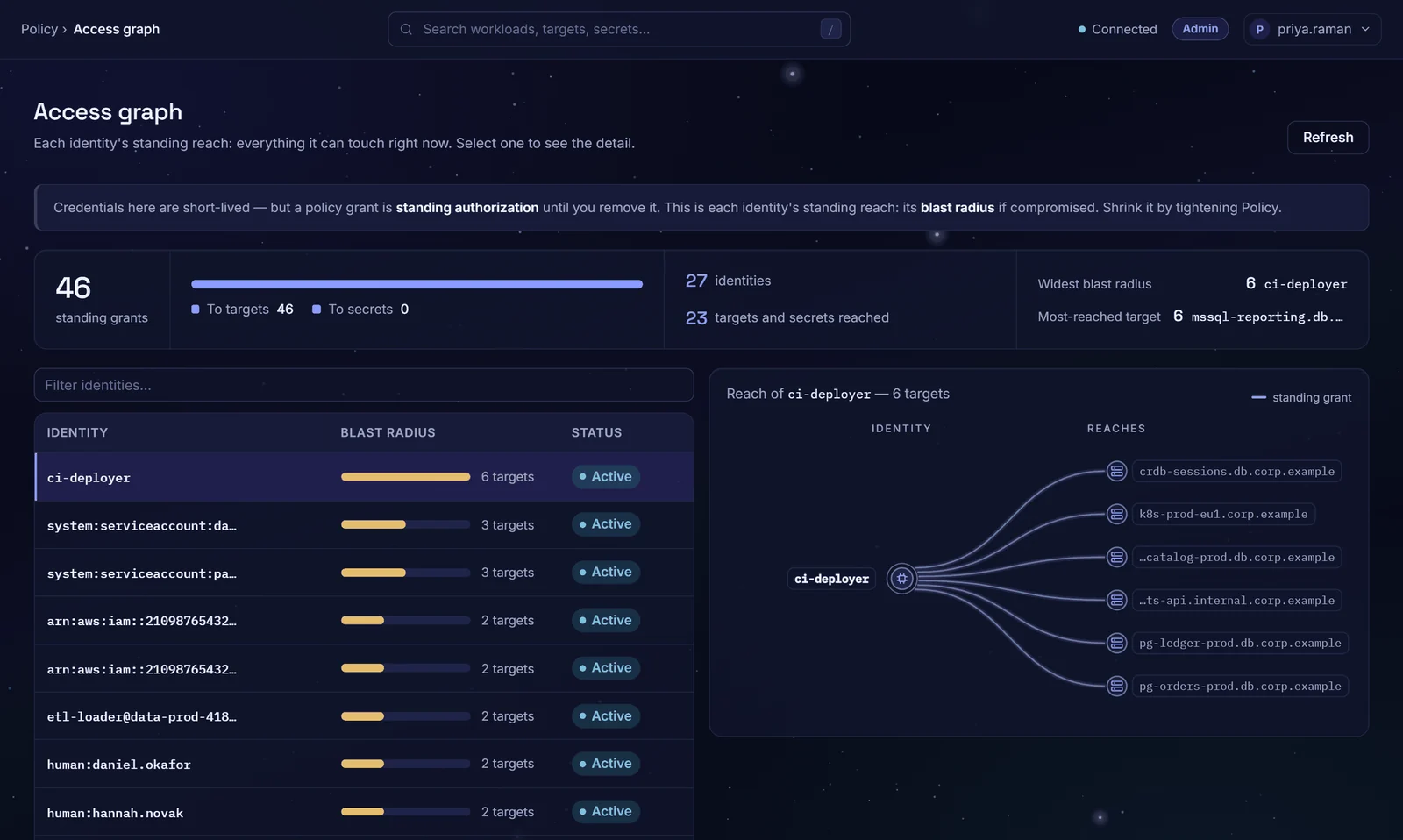
See standing reach
The access graph shows what each person and workload can reach now, by the rules that decide connections.
A log that shows tampering
The audit log is append-only and hash-chained: editing or removing an earlier entry breaks the chain.
From scan to evidence
Discover
Scan a network for hosts, then the hosts for their accounts.
Onboard
Place what was found in a safe, by hand or by rule, or dismiss it.
Review
An Admin opens a campaign with a due date, and safe owners decide each item.
Prove
Export campaign decisions, the entitlements report and the filtered activity log as CSV.
The systems you already run
- PostgreSQL
- CockroachDB
- MySQL
- MariaDB
- SQL Server
- Oracle
- Linux over SSH
- Windows over WinRM
- Syslog
- Webhooks
- SCIM 2.0
Account discovery covers these databases and servers, and FortiGate once an Admin adds a discovery conversation to its platform.
Questions buyers ask
What does discovery find?
A network scan reports each host that answers with the service it proved on the wire, or unknown. An account scan reads login names, never passwords; on Windows, local accounts only. An operator starts each scan.
How do access reviews work?
An Admin opens a campaign over some or all safes, with a due date; campaigns are not scheduled. Certify keeps the access; revoke removes it at once, except access held through a group, which can only be kept. Past the due date and any grace days, the campaign reminds (the default), escalates to the safe's owners and approvers, by email when SMTP is set up, or revokes what is left; an Admin's access, break-glass grants and group access are escalated instead.
Can an auditor check the log was not altered?
Yes. Each entry carries a sequence number and the SHA-256 hash of the entry before it, so editing, removing or reordering an earlier entry breaks the chain. Any console role can run the API's verify check, which names the first broken line. Cutting the newest entries shows only against an outside copy, such as your SIEM's. The activity CSV does not carry the chain. In a multi-node deployment each node keeps and verifies its own chain.
Can we send events to our SIEM?
Yes, as each entry is written: JSON to a webhook, RFC 5424 syslog over UDP or TCP, or both. It is best effort: if the buffer fills, entries are dropped and counted, and the local log stays the record of truth. Syslog has no TLS option.
Do you sync users from our directory?
Yes, users and groups over SCIM 2.0, once you set a SCIM token, and a safe can give access to a synced group. A user your directory deactivates is disabled and signed out; the record stays for the audit trail. SCIM never creates or changes an Admin.
See it on your own systems
Four weeks on your own servers and a database.