Command center
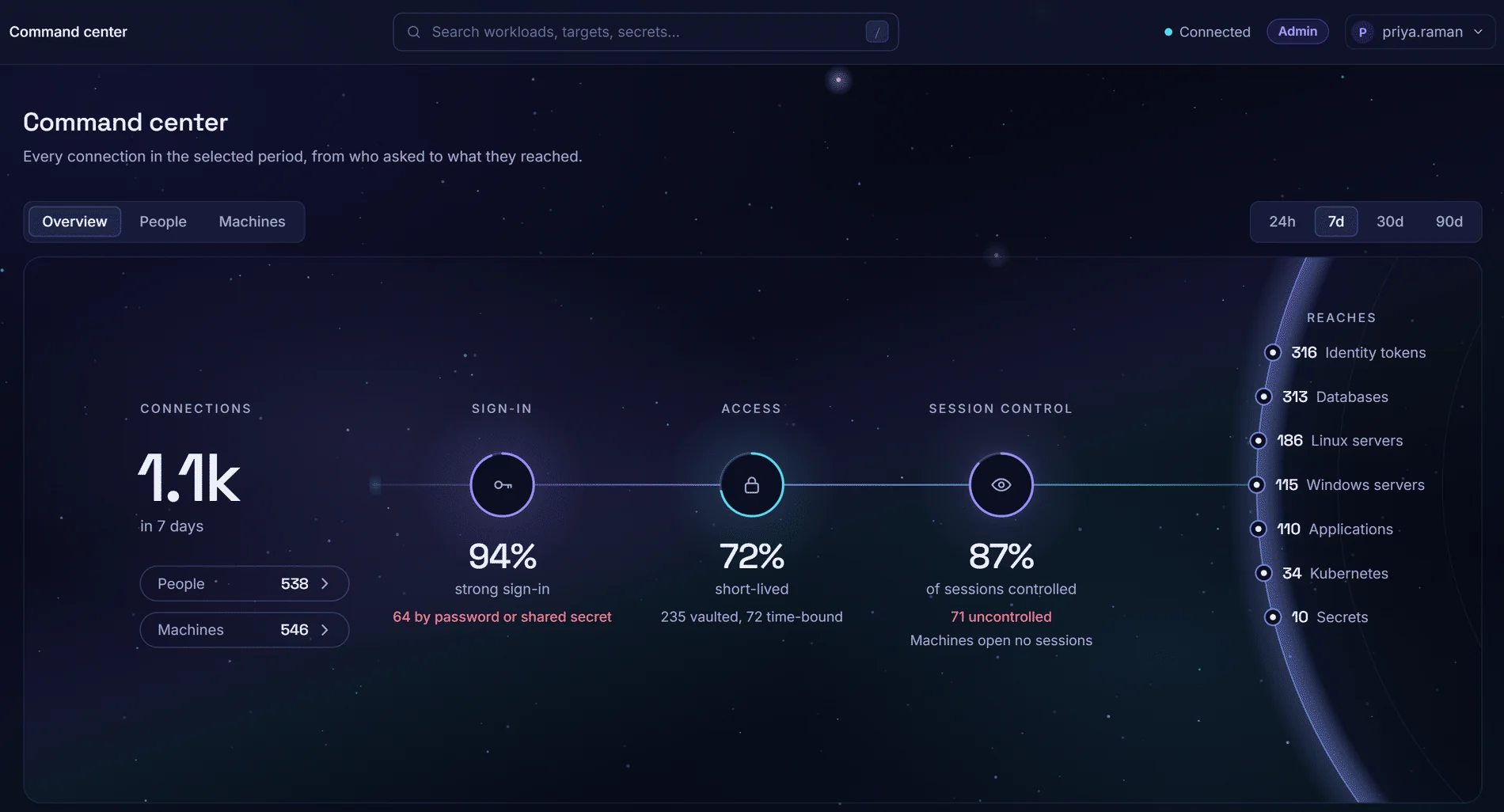
One map of the connections Zerostand granted in a period you pick: how each person or machine signed in, the access they used, the session control and what they reached, with the gaps marked.
Nobody can say who reached what, and how
No single view
Who reached which server, how they signed in and under what control sits in separate logs.
Gaps found in the audit
A password-only sign-in or an unwatched session comes to light only when an auditor asks.
Machines counted elsewhere
Reports cover people; services connecting with keys and tokens are counted elsewhere, if at all.
22%of breaches began with credential abuse, the leading initial attack vector. Source: Verizon 2025 Data Breach Investigations Report.
Every granted connection, counted
One record per connection
On a SQL store (PostgreSQL or SQLite), every door that grants a connection writes one record. View the last 24 hours, 7, 30 or 90 days.
People and machines
Switch between people and machines to see each one's paths from sign-in to destination.
Sign-in strength
The share of recorded sign-ins that were strong. A password alone, or a machine's shared secret, is marked as a gap.
Short-lived or vaulted
The share of all connections that used a credential made for them, outside a grant; the rest are split into vaulted, time-bound grant and typed by hand.
Sessions controlled
The share of people's sessions that were recorded, approved or confirmed with MFA at connect. The rest are marked uncontrolled.
Systems reached
Connections by destination: Linux and Windows servers, databases, applications, Kubernetes, secrets and identity tokens.
Needs attention
- Over-privileged, unused or stale identities
- Access that stays open instead of expiring
- Static secrets and accounts no safe governs
- Policy or accounts pointing at something that no longer exists
- Access reviews past their due date
The four most severe posture findings show under the map; Review opens the Posture view.
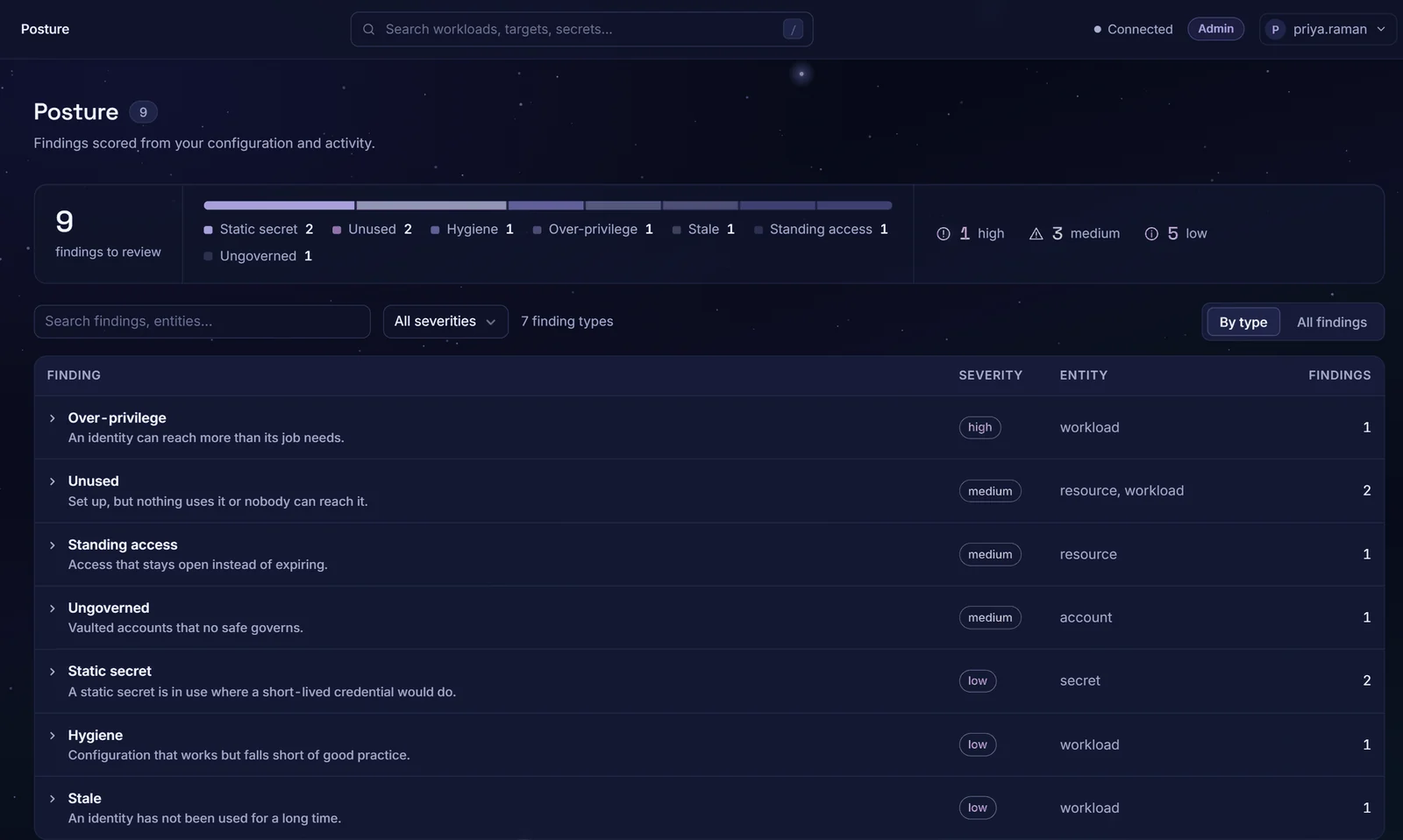
The Posture view: findings grouped by type, with severity and the entity affected.
From connection to fix
Record
Each connection is stored as who, sign-in, credential, controls and destination; never a secret.
Map
The period is drawn as four stations: sign-in, access, session control and what was reached.
Trace
In People or Machines, hover a step to trace every path through it.
Fix
Each finding carries a remediation and, where your role allows, a button to the page where it is fixed.
What the map counts
- Linux servers
- Windows servers
- Databases
- Applications
- Kubernetes
- Secrets
- Identity tokens
Sign-ins are counted by method: password or single sign-on, with or without MFA, for people; AWS, Azure, GCP, Kubernetes, OIDC or a shared secret for machines.
Questions buyers ask
Where does the data come from?
From the connection record: each door that grants a connection, from an SSH session to a shown password or a workload's token, writes one row of labels. It needs the SQL store (PostgreSQL or SQLite); the default single-node file store keeps no record, and the console says so.
How far back does it go?
90 days, the longest period the map offers. Older records are pruned. If the record began inside the period you pick, the map says from which date.
Does it include machines?
Yes. The tokens, JWT-SVIDs, dynamic database logins and secrets that workloads collect count as machine connections.
Can we act on a gap from here?
Each gap says what to change, such as requiring MFA or moving a machine to an attested identity. The map itself changes no setting.
Who can see it?
Administrators and auditors. Other roles see a message saying so instead of the map.
Are the counts complete?
If the node serving the console failed to write some records since it started, the map says how many and that counts may be low; every failed write is also logged and counted in a metric.
See it on your own systems
Four weeks on your own servers and a database.